Booking, door, analytics

Run the night.

Backline is the operations platform for nightlife and live events. Book the talent, run the door, and see how the night did, all in one place.
Backline event overview: arrivals, capacity, ticket and bar revenue, and guest list tiers
Built forVenuesPromotersFestivalsEvent producersBooking agencies
Door

Every ticket, one line.

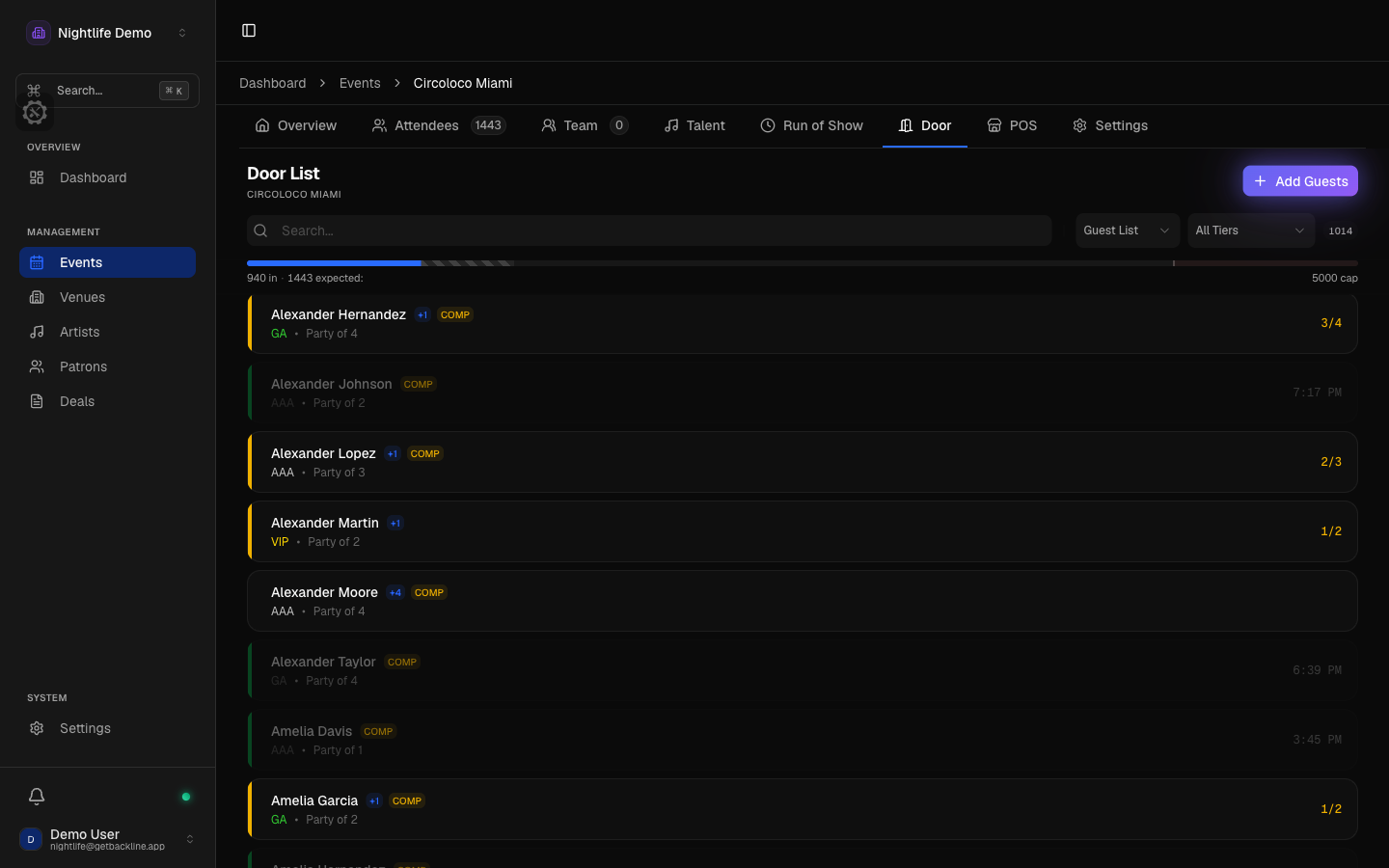
Your guest list and every ticket you sold, on one list, behind one search. One phone scans all of it, so the line moves at one speed instead of four. Nobody stands at the door with three apps open.

  • Connected providersTickets show up on their own
  • Everything elseUpload the export, done
  • Your tiersTheir ticket types become your tiers
  • Sync problemsYou hear about it before the door does
  • One scanner for every providerWhatever a provider printed on the ticket, the phone reads it. Every scan tells the door person what happened in plain words: in, already in, refunded, canceled, transferred, or not one of ours.
  • Guests and tickets in one searchType a name and find the guest. Point the camera and find the ticket. Same list, same capacity count, whichever phone is working the door.
  • Partial parties, plus-ones, comps, undoA party of four can arrive two now and two later. Plus-ones get their own line, comps are marked per guest, and a mistaken check-in is undone in a tap without losing the record.
  • The door works without signalSet up a door phone before doors and it keeps working for up to 24 hours without signal. When it reconnects, everything it did syncs back.
app.getbackline.app / door
Backline door list with a Scan button, tiers, comps, and party arrivals
How a night runs

Book it, advance it, open the doors, settle it.

The deal, the rider, the door, and the settlement all live on the same event. Nothing gets typed twice.

  1. Step 1

    Book

    Hold the date at first, second, or third priority, then send an offer with a guarantee, a percentage, or a versus deal. The artist accepts from a link. No account, no PDF back and forth.

    Booking
  2. Step 2

    Advance

    A confirmed deal becomes the artist's advancing page with the set time already filled in. Upload the rider, add flights, hotel, and ground, and send the artist their day sheet.

    Booking
  3. Step 3

    Doors

    Your guest list and every provider's tickets on one list, one scanner. The capacity count moves as people walk in, on every phone working the door.

    Door
  4. Step 4

    Settle

    Sales by provider, bar revenue from Square, expenses, and margin. You know whether the night covered the artist fee before you book the next one.

    Analytics
Products

Tools for your event team.

Five products, one event. Turn on what tonight needs.

Door

Guest lists and every ticket provider in one line.

  • Every ticket provider on one door list
  • One scanner for every ticket
  • Keeps working for 24 hours without signal
See Door

Booking

Offers, holds, and advancing from one deal.

  • First, second, and third holds on a date
  • Offers the artist accepts from a link
  • A confirmed deal becomes the advancing page
See Booking

Show Control

Set times, stages, and the status of every artist.

  • Run of show by stage, with changeovers
  • Alerts when a set moves and 15 minutes before it starts
  • A public lineup page with stages and set times
See Show Control

Analytics

How the night sold, who came, and what it cleared.

  • Sales over time, split by ticket provider
  • Margin, and whether the night covered the artist fee
  • Eve, an analyst you can ask questions
See Analytics

Table Service

Coming soon

Floor plans, deposits, and reservations. In pilot with a few venues.

  • Floor plansPer room or area
  • DepositsPaid up front, table held
  • ReservationsRequest, counter, confirm
Talk to us about seating
Analytics

Know what the night cleared.

Every ticket, comp, and bar tab lands on the same event, so the numbers after the night are the numbers from the night.

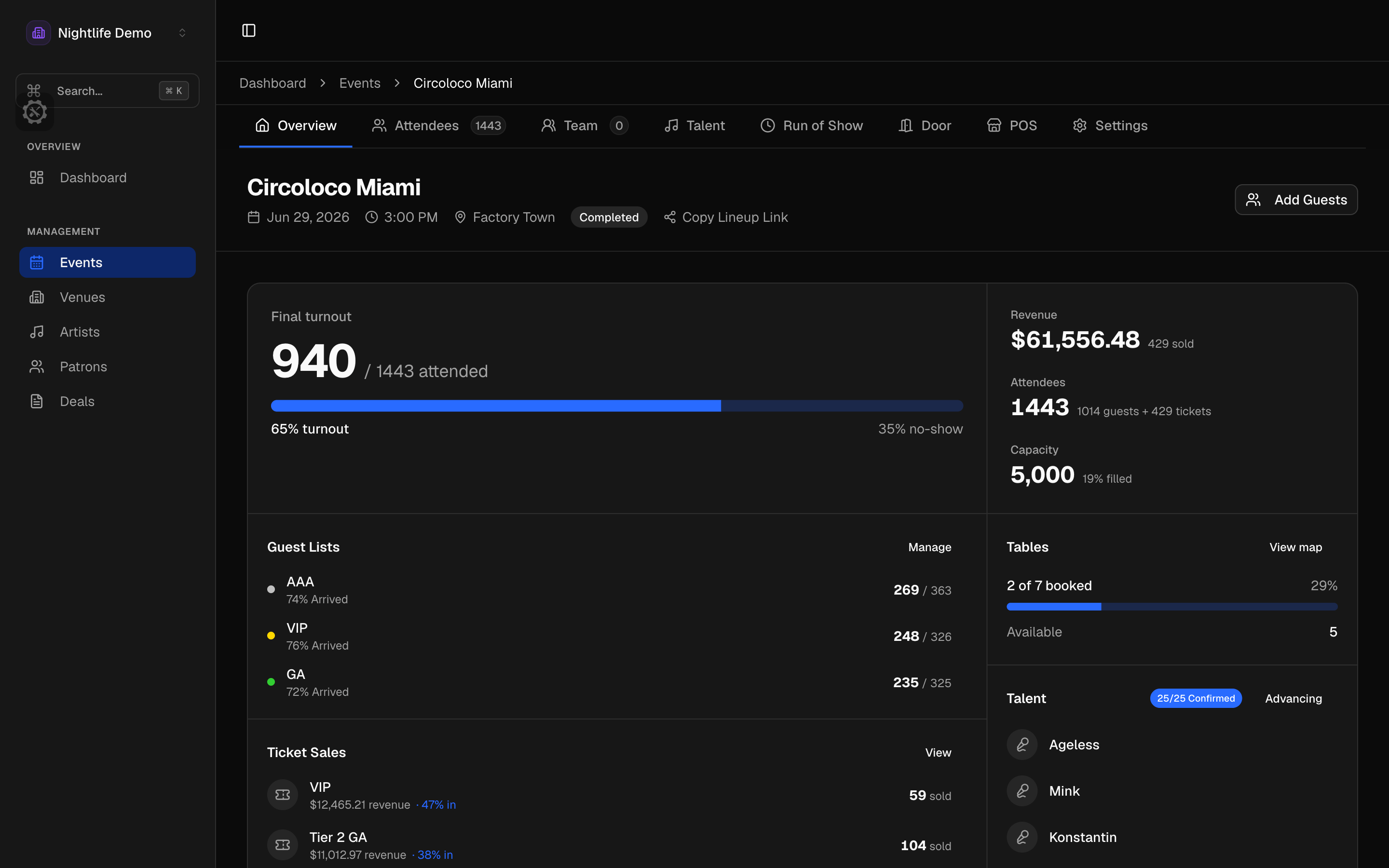
app.getbackline.app / overview
Backline event overview: arrivals, capacity, ticket and bar revenue, and guest list tiers
  • Sales over time, by providerBy day, by week, or the whole run up to the show, split by provider or as one total. If a provider's numbers are incomplete, the chart says so instead of guessing.
  • Who came, and who came backGuest list against paid, first-timers against people who keep coming back. A guest who bought on two providers and came twice is still one person.
  • What the night clearedTickets, bar, and tables against what you committed and what you paid, with the margin and whether the night covered the artist fee. If a number is missing, you get told, not a made-up total.

Ask Eve, the in-app analyst, to compare events or rank your best nights.

Team

Everyone sees their own night.

Every role is a starting point, not a box. Give each person the part of the night they work, and nothing else.
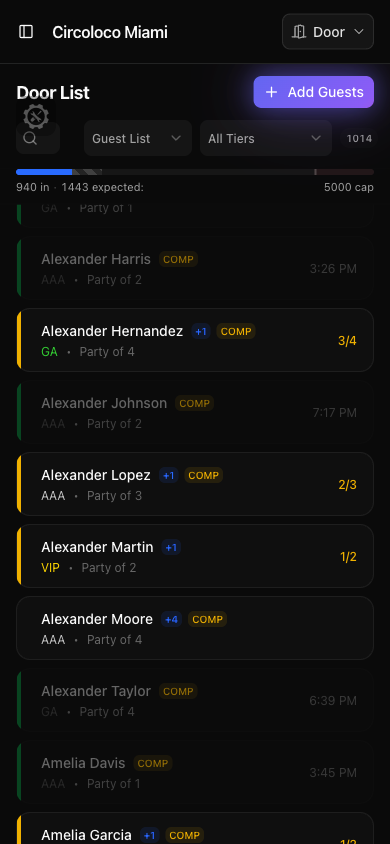
Backline door check-in on a phone: search, the guest list, and one-tap check-in
  • A role for everyone on the nightOwner, manager, door, hospitality, stage manager, bar manager, talent buyer, and more. Each role is a starting point, and you can adjust what any one person sees.
  • Door staff never see revenueTicket revenue, artist fees, expenses, and bar sales are each their own permission. A talent buyer can see the artist fee without seeing ticket revenue. A bar manager sees the bar and nothing else.
  • Shared door loginsDoor, hospitality, stage, and bar staff can share a login with no personal email, for the people who work three nights a month.
  • The app your door staff already hasiPhone and Android, with your events and the full door. Sign in with Apple, Google, or email. Available in seven languages.
Pricing

Plans for small teams, busy venues, and larger organizations.

View pricing
FAQ

Common questions

Who is Backline for?
Venues, promoters, festivals, and event producers who run a door, book talent, and want to know how the night did.
Which ticket providers does Backline work with?
The major nightlife ticket providers. Most connect directly and keep your door list current on their own. For the rest, upload the export file from the provider and the tickets land on the same list. The Door page lists the current providers.
Does Backline sell tickets?
No. Backline never sells a ticket. You keep selling on the providers you already use, and Backline pulls what they sold onto one door list next to your guest list.
Does the door work without signal?
Yes. Set up a door phone before doors and it keeps scanning and checking people in for up to 24 hours with no signal. When it reconnects, everything it did syncs back, and if the same guest was let in on two phones, Backline shows you rather than guessing.
Is there a mobile app?
Yes, on iPhone and Android. It carries your events and the full door: search, scan, check in, undo, and add guests. Sign in with Apple, Google, or email. Available in seven languages.
Can I control what each teammate sees?
Yes. Every person gets their own permissions, and money is split into ticket revenue, artist fees, expenses, and bar sales. Door staff see arrivals, not revenue, unless you decide otherwise.
Is Table Service available?
It is in pilot with a few venues. Floor plans, table inventory, deposits, and booker history are built. Get in touch if you want to talk about your room.
Can I see it before signing up?
Yes. Request a demo and tell us about your events. We will walk you through a door, a deal, and the numbers the morning after.

Still have questions? Chat with our team

See Backline in action.

Tell us about your events. We’ll walk you through the door, a deal, and the numbers after.